
Build a portfolio report that gets you hired
3 hours. No DAX. No data modelling. You finish with one report in your portfolio and a plan for putting it in front of people who hire.
Founding price is 99 USD for people on this list. It goes to 149 USD after launch November 2026. Joining costs nothing and commits you to nothing.
How I know this works
Hi, I am Marcin. Five years in Power BI as a developer, consultant and technical lead. More about me at the bottom.
I did the same thing in 2020.
My first BI job came from a report I built on a course. There was no experience on my CV pointing at BI.
A year later a recruiter wrote to me on LinkedIn. I took that same report, fixed the parts that looked weak, and it got me my second job.
Then I built a football dashboard for another process. That process died before the final stage, so I put the report on LinkedIn and moved on. A few months later a different recruiter reached out. I showed him the football dashboard in the interview and it turned into the biggest contract I have signed.
Every one of those conversations moved because I had a report that looked finished and was ready to show the day someone asked.
What you walk away with
- A professional Power BI report that catches a recruiter’s eye and shows what you can actually do.
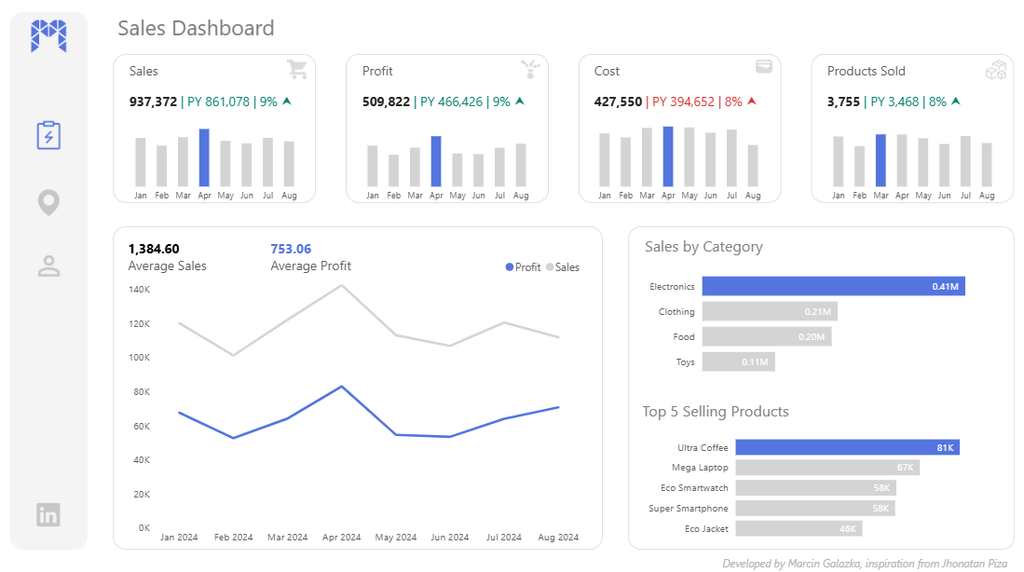
- A layout designed in Figma and exported into Power BI, so the report looks made on purpose instead of assembled from defaults.
- A repeatable way to build the next report in a fraction of the time. AI generates the data and the measures, TMDL loads them into the model in one move, and you spend your evening on the layout instead of the setup.
What is inside
1. Pick the topic and build the data (35 min)
Choosing what you build before you build it. E-commerce sales lands differently than a weather report. Then generating the dataset and the model with AI.
2. Measures and choosing the visuals (45 min)
Measures with AI and TMDL. Then the layout logic: 2 pages, 4 to 5 KPIs on top, supporting visuals below, a map on page 2.
3. Design it in Figma, export it to Power BI (70 min)
The longest part, split into 4 lessons. Grid, whitespace, color rules, KPI cards that carry a message. Professional design done in FIGMA then exported into Power BI.
4. Put it where it can be found (28 min)
Turning the report into a PDF a recruiter opens. This is exactly what I attached to my CV, and it is what got me interviews. Full page screenshots, clean export, the right order. A short screen recording if you want to show the interactions, done with what is already installed on your machine. I will also show you my own posts where I shared reports, so you can see what I did.
Appendix: publishing a live link (3 min)
If you have a work or school account, Power BI lets you publish a public link to the report. I will show you where the setting is. This does not work with a personal Gmail, so treat it as a bonus, not a requirement.
Who this is for
Join if:
- You are looking for your first BI job, or your next one.
- You want a professional report in your portfolio this month.
- You know DAX and data modelling, but your reports look like Excel 2007.
Skip this one if:
- You came for DAX or data modelling. I teach neither here.
- You already have a portfolio that gets replies.
- You are a team lead looking to standardise reporting across a company. That is my design system work, a different thing entirely.
Who is teaching this

In 2020 I moved from finance to BI, in the middle of the pandemic, with no BI experience on my CV and nothing to show except a report I had built during one course.
Five years later I have worked as a Power BI developer, consultant and technical lead managing Power BI platform with 2000+ users and 400+ reports. And I build design systems for reporting teams so their dashboards stop looking like they came from 5 different companies.
I also give away finished PBIX files, 6 of them so far, with the background designs included. Open them and check my work before you decide anything about the course.
Three questions
Do I need to know DAX ?
If you can write a basic measure, you are fine.
This course is about report design, not DAX.
When does it launch?
November 2026. Enrolment opens on 5 October, and that is when this list gets the founding price.
What does it cost ?
99 USD if you are on this list. 149 USD after launch. Enrolment opens on 5 October and the founding price is only available then.
Get the founding price
Enrolment opens on 5 October at 99 USD. This list gets the link first.
One email when it opens. Unsubscribe any time.
P.S. If you scrolled straight to the bottom: this is a 3 hour course on Power BI professional report design, launching November 2026. It costs 99 USD if you are on this list, 149 USD after. Joining the list costs nothing and commits you to nothing.